Ask what breaks before the agent changes a column
Agents made shipping faster and schema changes riskier. When the data flow runs through three database systems, sixteen views and a report that exists nowhere in the repository, "what does this change touch?" becomes a question you have to answer first — and cross-instance column lineage is how you answer it.
11 min read Agent Column lineage MCP
A change that passes every check
Start with a thought experiment.
An agent is handed a small task: change the shop's net-amount column,
net_amount, from "computed once at checkout" to "recomputed after every
refund". It reads the repository, updates the ORM model, edits a migration, changes the application logic, adds tests, commits. CI is green and the review takes five minutes —
the reviewer sees a diff that hangs together.
Sometime after midnight, two weeks later, the warehouse's daily job fails.
The cause is not in any line of code in that commit. The orders table lives in MySQL, the warehouse in PostgreSQL, the serving layer in StarRocks. There are no foreign keys between them and no cross-database constraints; what links them is a dozen-plus view and materialized-view definitions, a few scheduled jobs, and some SQL that lives in a wiki, in a reporting tool and in an upstream application.
The column the agent changed kept its name through the warehouse (it is still net_amount there), then forked: it feeds balance_due, payment_coverage
and month_net_rank, it is aggregated into net_line_amount for
a regional daily report, it becomes the customer label is_vip, and it
reaches the serving layer as revenue_tier.
No single repository sees both ends of that chain. The half of the picture the reviewer could see happens to leave out the part that breaks.
Why agents made this worse
Three things happened at once.
First, writing a change and understanding a change came apart. An agent lands an order of magnitude more change per day than a person used to, while the number of people who can say what a change will hit stayed the same. Once review bandwidth is the bottleneck, review degrades into "looks right": the syntax is fine, the tests are green, the column name is sensible. A few changes a day used to leave room to ask the warehouse team; now nobody asks, and nobody has time to answer.
Second, an agent's field of view is its working directory. Give it a repository and it can read every file in it. What it cannot read: view definitions sitting in a database, report SQL sitting in a BI tool, statements inside scheduled jobs sitting in an orchestrator, a materialized view in another engine sitting in another process. None of that is usually in the repository you are changing, and no amount of searching turns it up. The agent is not careless; it can only see the part of the world you handed it.
Third, a schema change is one of the few operations a rollback cannot undo.
Code can be reverted; after DROP COLUMN the data is gone. Worse is the delay:
the day of the change everything is fine, and the failure surfaces on the next scheduler tick — in a system that holds no reference back to the repository the change was made in, so the
investigation starts from nothing.
Why reading the diff and grepping the code fail
Faced with "what happens if this field changes", you reach for one of two moves: read the diff more carefully, or search the code more thoroughly. Neither is enough.
- Names change. Data gets renamed at every layer; that is normal in a
warehouse, and it is what makes a rename dangerous:
net_amountreappears under 15 different names downstream, includingbalance_due,payment_coverage,month_net_rank,lifetime_net,avg_order_valueandrevenue_tier. Searching by name finds the one that kept it; the rest depend on somebody remembering them. - Cross-engine, there is no common ground. Between a MySQL schema and a PostgreSQL schema there are no constraints, no type checking, no reference you can jump to — table and column names are the interface between systems, and that interface has no compiler. The only thing linking them is that data actually flowed from one to the other.
- A search looks at text, not at flow. A column name appearing in a statement does not mean the statement reads that column (it may be a comment, an alias, or dead code); and a column can be missing from every text you can search while genuinely flowing downstream.
Answering all of that at once takes more than a smarter search. It takes a graph: tables and columns across instances, derived from metadata, SQL definitions and scheduler events.
What one table's chain actually looks like
The numbers below come from a running environment: a shop database
on MySQL 8.4, a warehouse on PostgreSQL 16 (ods / dwd / ads — the source, detail and report layers), a serving layer on StarRocks 4.1, joined by four Airflow pipelines.
The starting point is an unremarkable orders table: 16 columns, 4 indexes, 2,000 rows, 288 KB of data, InnoDB.
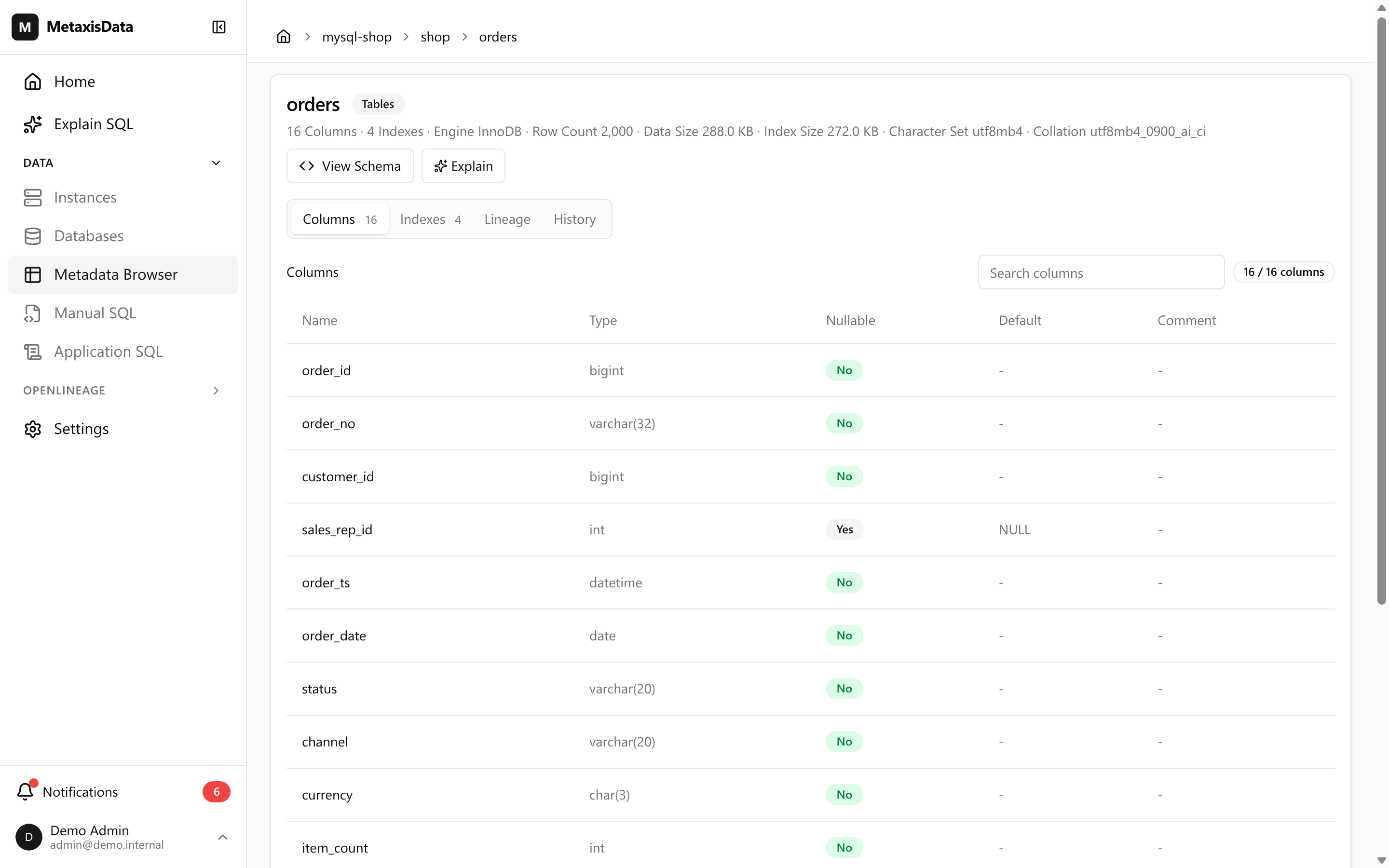
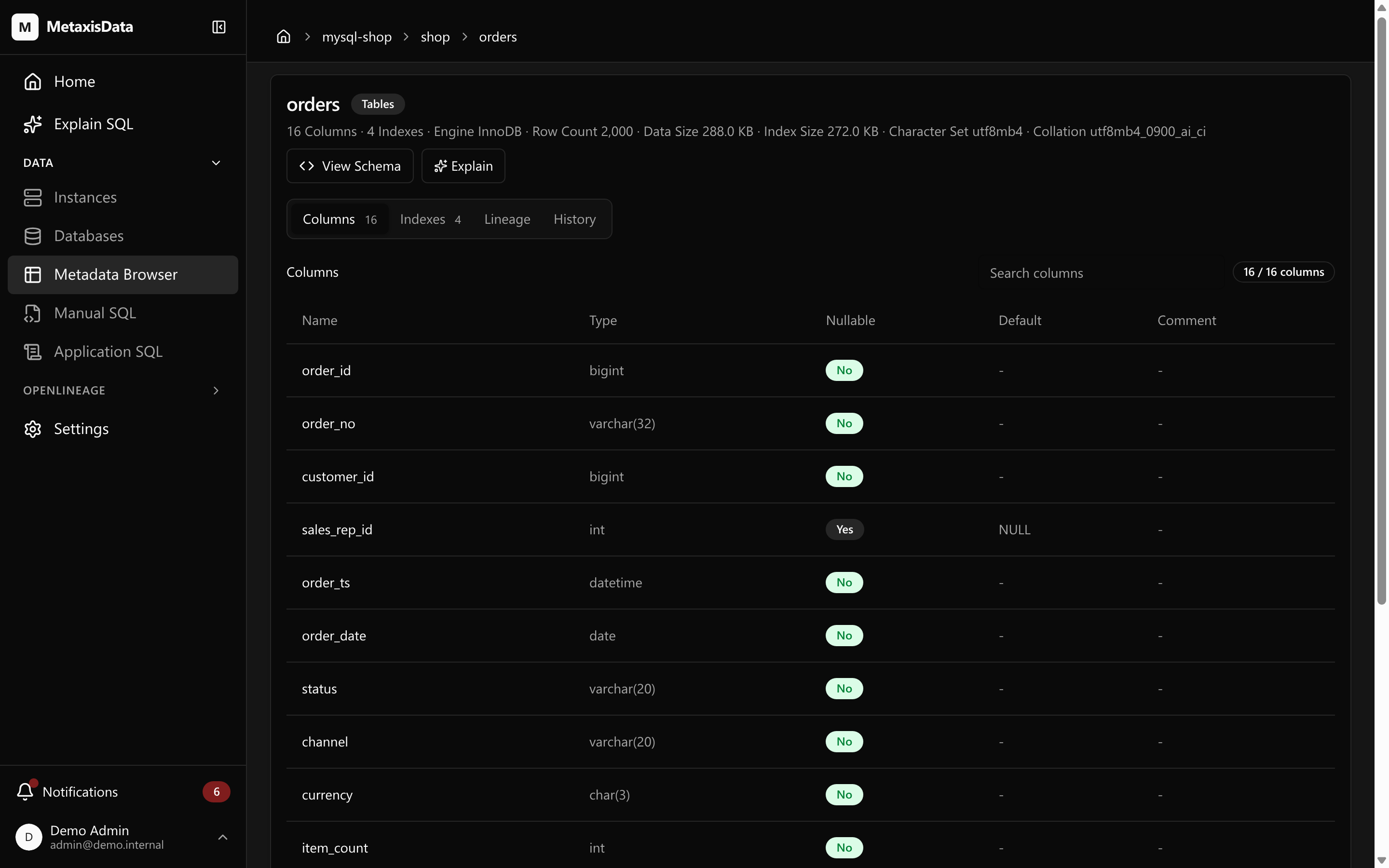
What matters is downstream.
Expand that table's downstream in one go and you get 33 objects and 399 column-level relations, reaching the sixth hop across three instances. The figure below is the first few hops of that same chain.
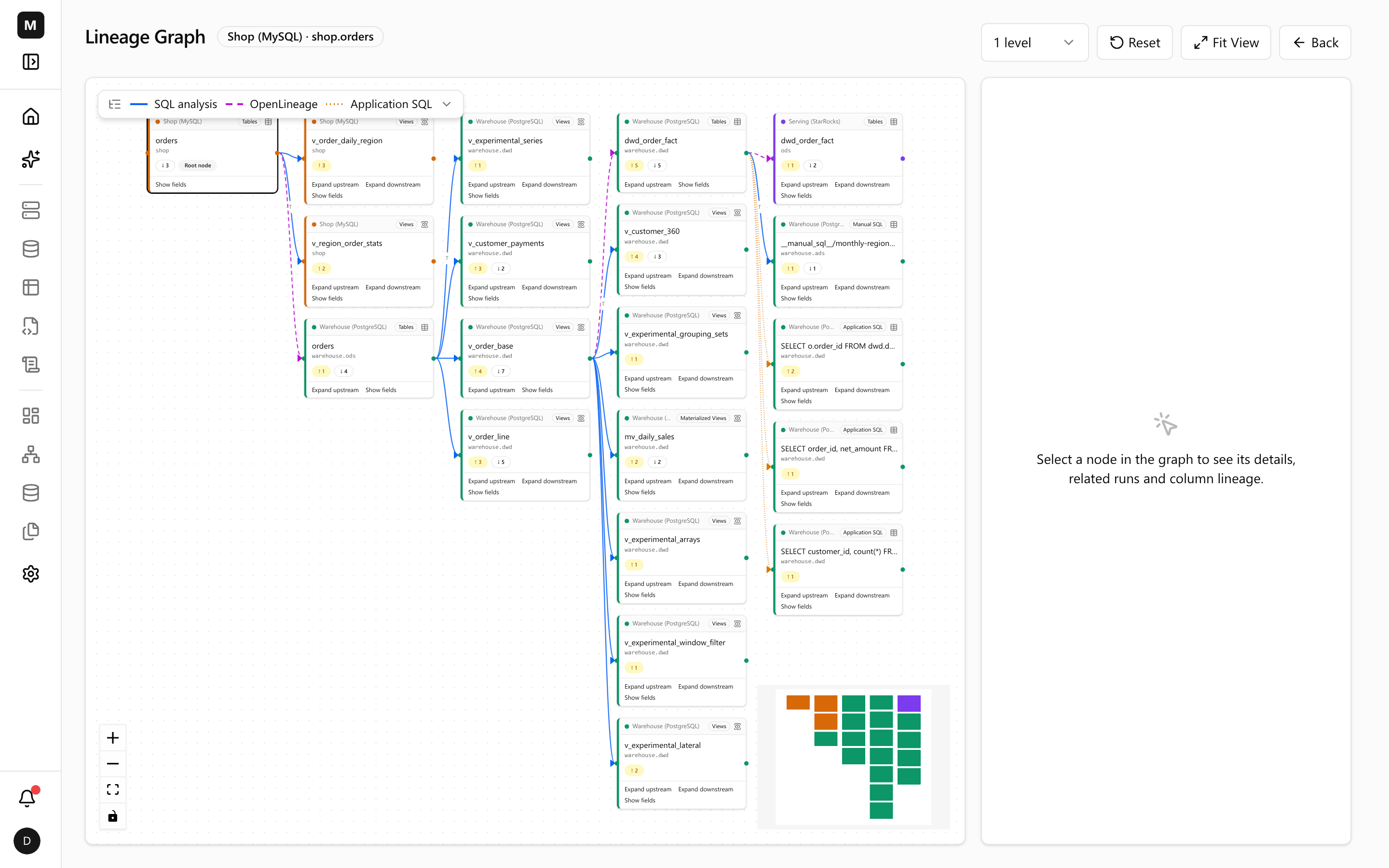
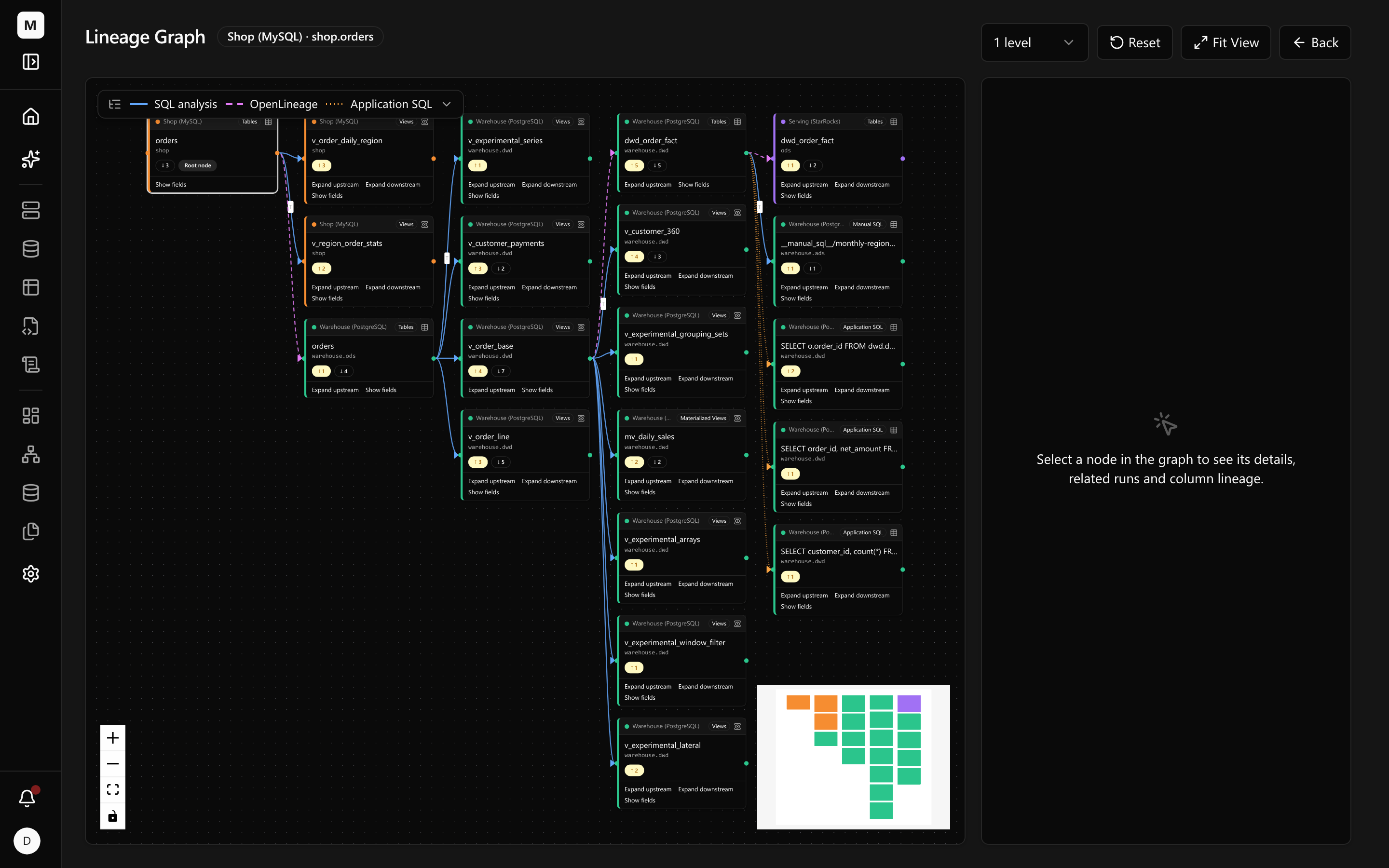
Three details in this graph are worth stopping for:
- The color bar on the left of each node is its instance. Follow one chain end to end and the color changes twice.
-
An edge's color and line style together say where the relation came from: relations parsed from SQL (views, materialized views, manual SQL) are drawn solid, statements an application reported are drawn dotted, and a scheduler's run events (OpenLineage) are drawn dashed. Every
cross-instance hop is carried by a scheduler event — the hop from MySQL to the
warehouse comes from an Airflow task called
ingest_shop_to_warehouse.copy_orders, and the edges from the warehouse into the serving layer come from five publishing tasks underpublish_to_serving. - The graph also holds things nobody counts as a dependency: one manual SQL object (a regional definition somebody wrote in a wiki) and three application-reported statements (SQL the application actually ran). None of them is in any repository, and all of them are on this graph.
These cross-instance edges find their way by namespace: usually the host and port in the event match a registered instance automatically, and when they do not, you map the namespace once and the mapping holds.
The spine is roughly this (the object names are real):
shop.orders (MySQL) └─ Airflow: ingest_shop_to_warehouse.copy_orderswarehouse.ods.orders (PostgreSQL) ├─ warehouse.dwd.v_order_base │ ├─ warehouse.dwd.dwd_order_fact │ │ └─ warehouse.ads.__manual_sql__/monthly-regional-revenue │ │ └─ warehouse.ads.ads_daily_sales │ └─ warehouse.dwd.mv_daily_sales └─ warehouse.dwd.v_order_line └─ warehouse.dwd.mv_daily_salesstarrocks.ods.ads_daily_sales (StarRocks) └─ starrocks.ads.v_sr_sales_band
Plus a set of side branches: v_customer_360, dwd_customer_360,
ads_customer_segment, ads_daily_sales, and five experimental
views — with dwd_customer_360, ads_customer_segment and ads_daily_sales
each mirrored on StarRocks.
In other words: changing one field in the shop's repository can reach six hops away, across another engine, onto a report somebody else maintains. Nothing along that path warns you.
What one field really reaches
Table level is alarming enough; the question that actually needs an answer is at column
level: I am changing net_amount — what breaks?
The same graph, narrowed to one field: select net_amount and the canvas keeps only that column's flow.
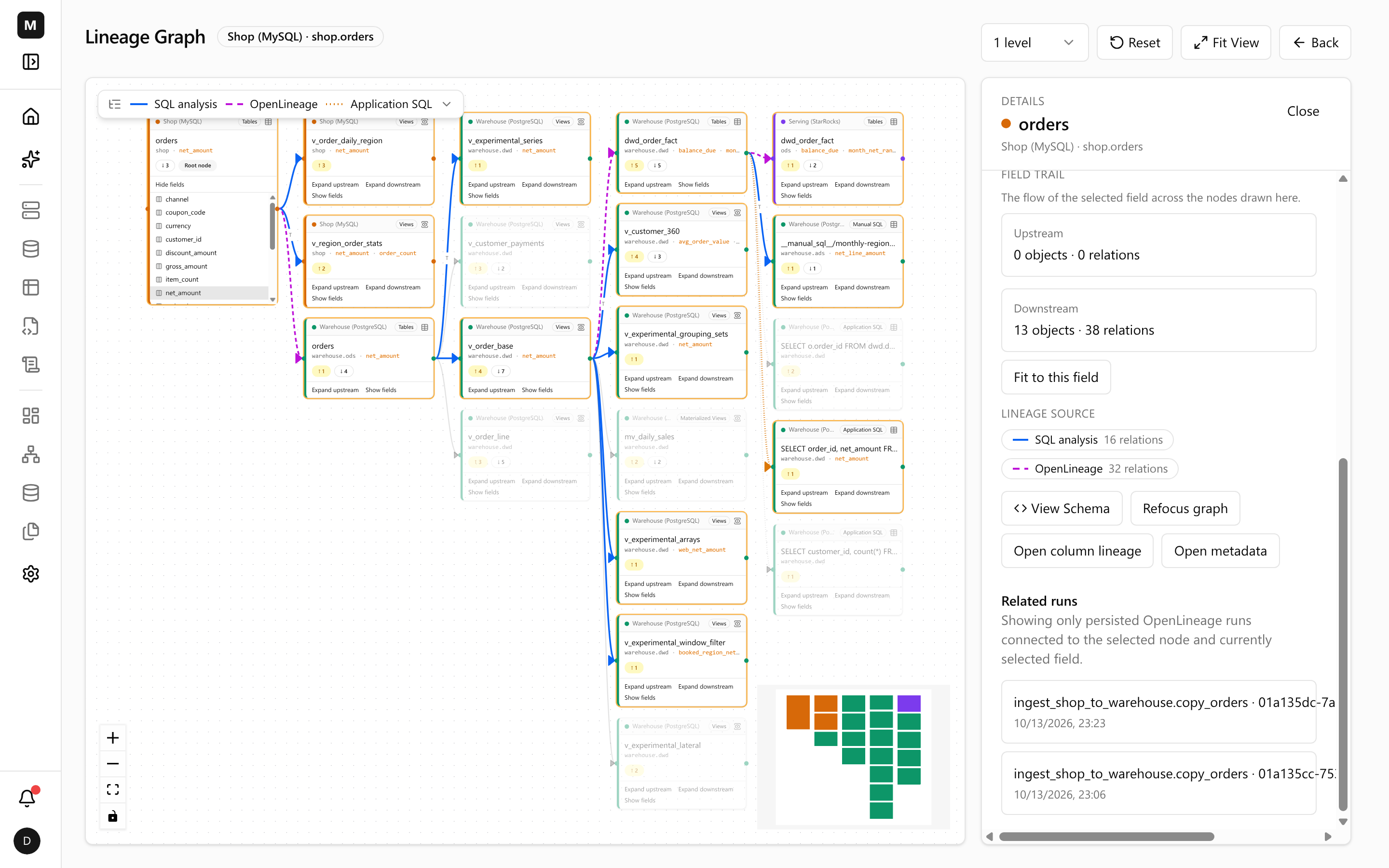
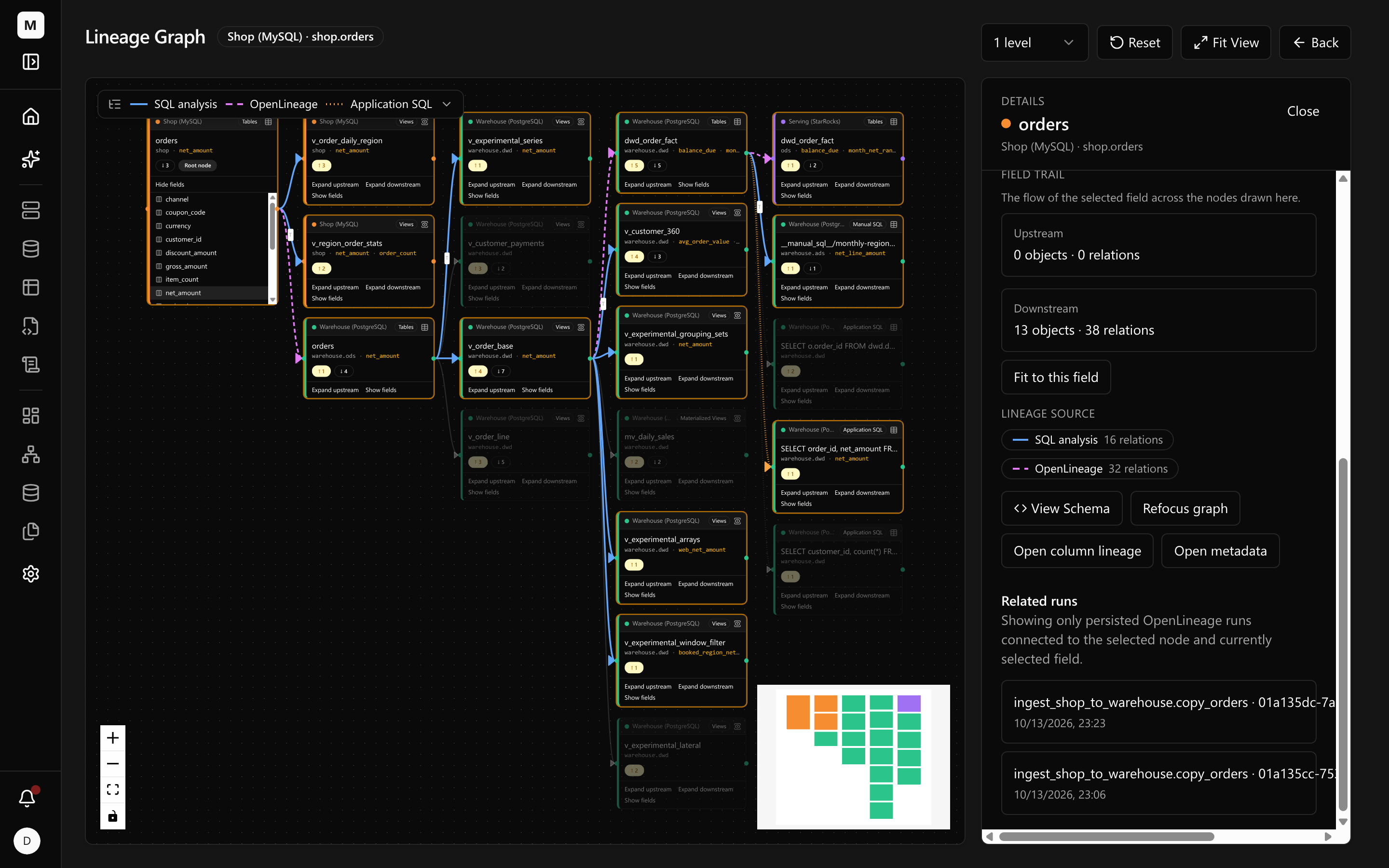
What only shows up at column level:
-
In
dwd_order_factthat one column feeds four fields:net_amount,balance_due,payment_coverageandmonth_net_rank. -
In
v_customer_360it feeds intolifetime_net,avg_order_valueandcollection_rate, and in a customer-segment label calledis_vip— one label's fate rests on this column. -
At the serving layer,
v_sr_channel_regionderivesrevenue_tierfrom it, and the materialized viewmv_sr_region_dailysums it by order date, region and channel.
There is one more layer: what each hop does to the value. Every relation carries its transformation — passed through, aggregated, or used only as a join key. That level of detail is what decides whether changing the column means also changing a definition.
Letting the agent ask: read-only tools over MCP
If all of this existed only behind a UI, it would never reach whoever actually writes the code — because an agent does not open a browser.
So the platform exposes its registry as a set of read-only tools over MCP (Model Context Protocol). Once enabled, the endpoint is served on the same port and authorized with OAuth 2.1 (PKCE required); the token is bound to that endpoint and carries workspace-wide read-only scope. The client configuration is just this:
{ "mcpServers": { "metaxisdata": { "type": "http", "url": "https://mx.example.com/mcp" } }}Nine tools cover the questions a change review asks: list instances, list databases, find an object by name, look at an object's direct children or its full structure, fetch its DDL, analyze what an arbitrary SQL statement reads and writes, get the multi-level lineage around one object, and confirm the caller's identity. All read-only; nothing here writes.
Hand the toolset to an agent and here is what it looks like: one sentence naming the column and the change — the agent works out the instance, database and column on its own — and the answer comes back grouped by system: the shop's own views, the warehouse's ods / dwd objects, the manual SQL and application SQL that live in no repository, and the StarRocks views built on top.
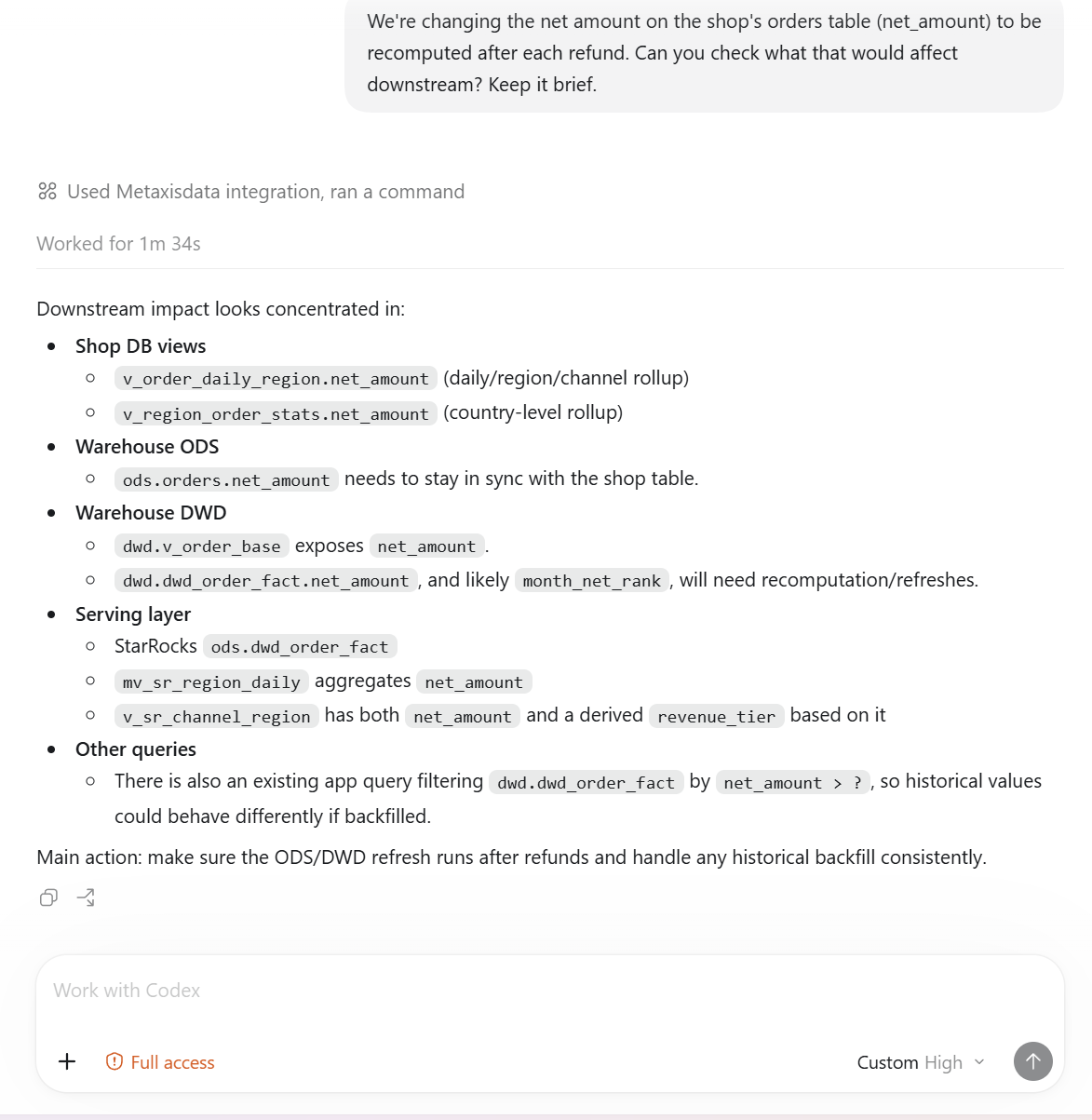
Back to our question. The agent asks this:
{ "jsonrpc": "2.0", "id": 5, "method": "tools/call", "params": { "name": "get_lineage_graph", "arguments": { "object": { "instance": "mysql-shop", "database": "shop", "name": "orders" }, "direction": "down", "depth": 10, "column": "net_amount" } }}That call returned 16 objects and 29 column-level relations, still across all three engines. What comes back is machine-readable JSON; here is one real response — the cross-instance edge:
{ "sourceGuid": "mysql-shop;shop;;orders", "sourceColumn": "net_amount", "targetGuid": "postgres-warehouse;warehouse;ods;orders", "targetColumn": "net_amount", "relationType": "DIRECT", "metaGuid": "openlineage:run:TASK:default:ingest_shop_to_warehouse.copy_orders:..."}And the aggregation at the far end of the chain:
{ "sourceGuid": "starrocks-serving;ods;;dwd_order_fact", "sourceColumn": "net_amount", "targetGuid": "starrocks-serving;ads;;mv_sr_region_daily", "targetColumn": "net_amount", "relationType": "GROUP", "transformations": [ { "operation": "AGGREGATE", "expression": "sum(net_amount)", "functionName": "SUM", "groupKeys": ["order_date", "region", "channel"] } ]}
Note relationType: DIRECT means the column passes through unchanged, GROUP means it is aggregated, a transformed column is marked INDIRECT, and a join key is marked JOIN. Those labels decide what changing a column actually means: a passed-through column moves values; a join key moves the result set.
One more thing that is easy to miss: every call is on the record. The audit log holds the tool, the caller, the arguments, the latency and the outcome — read-only queries included.
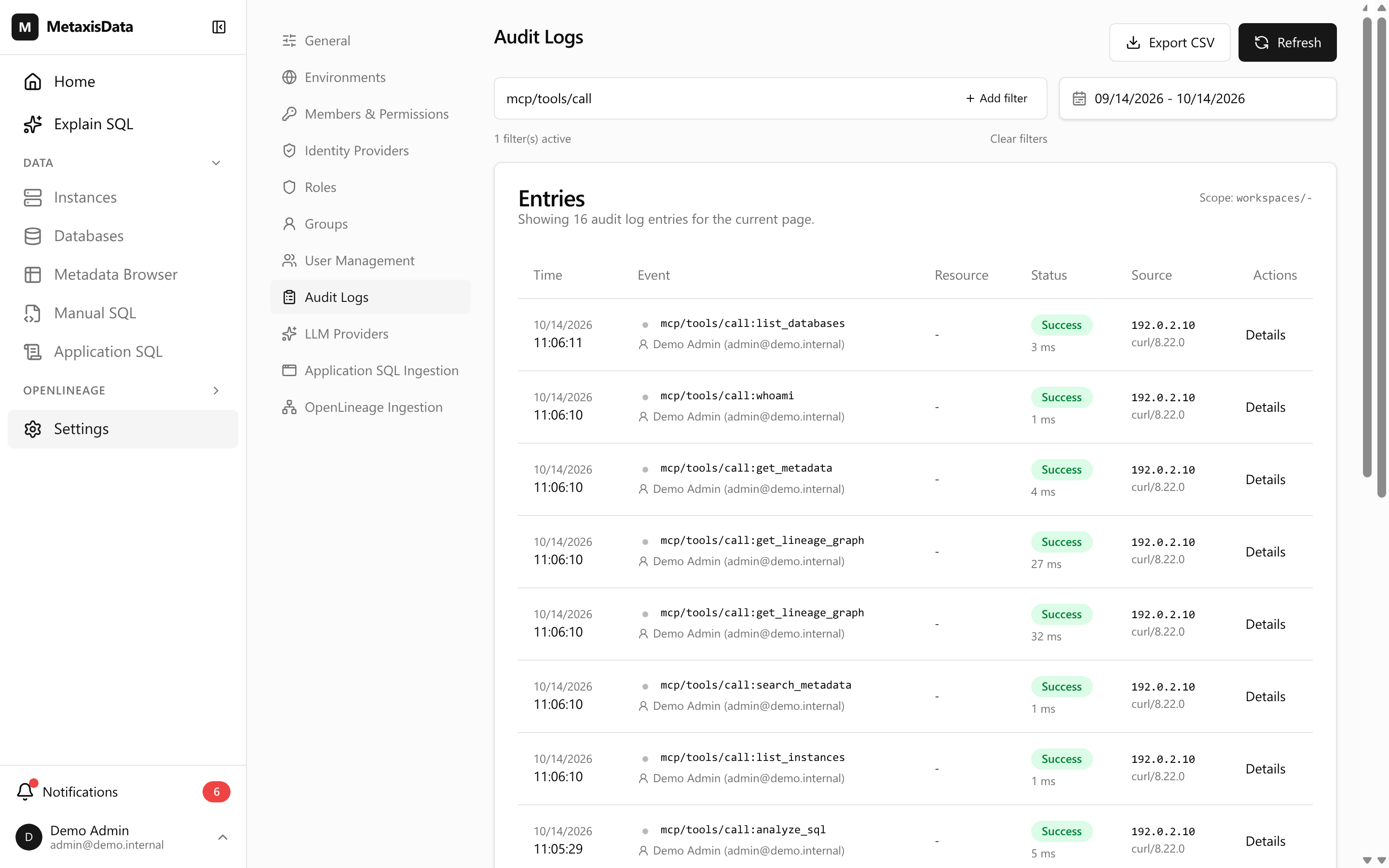
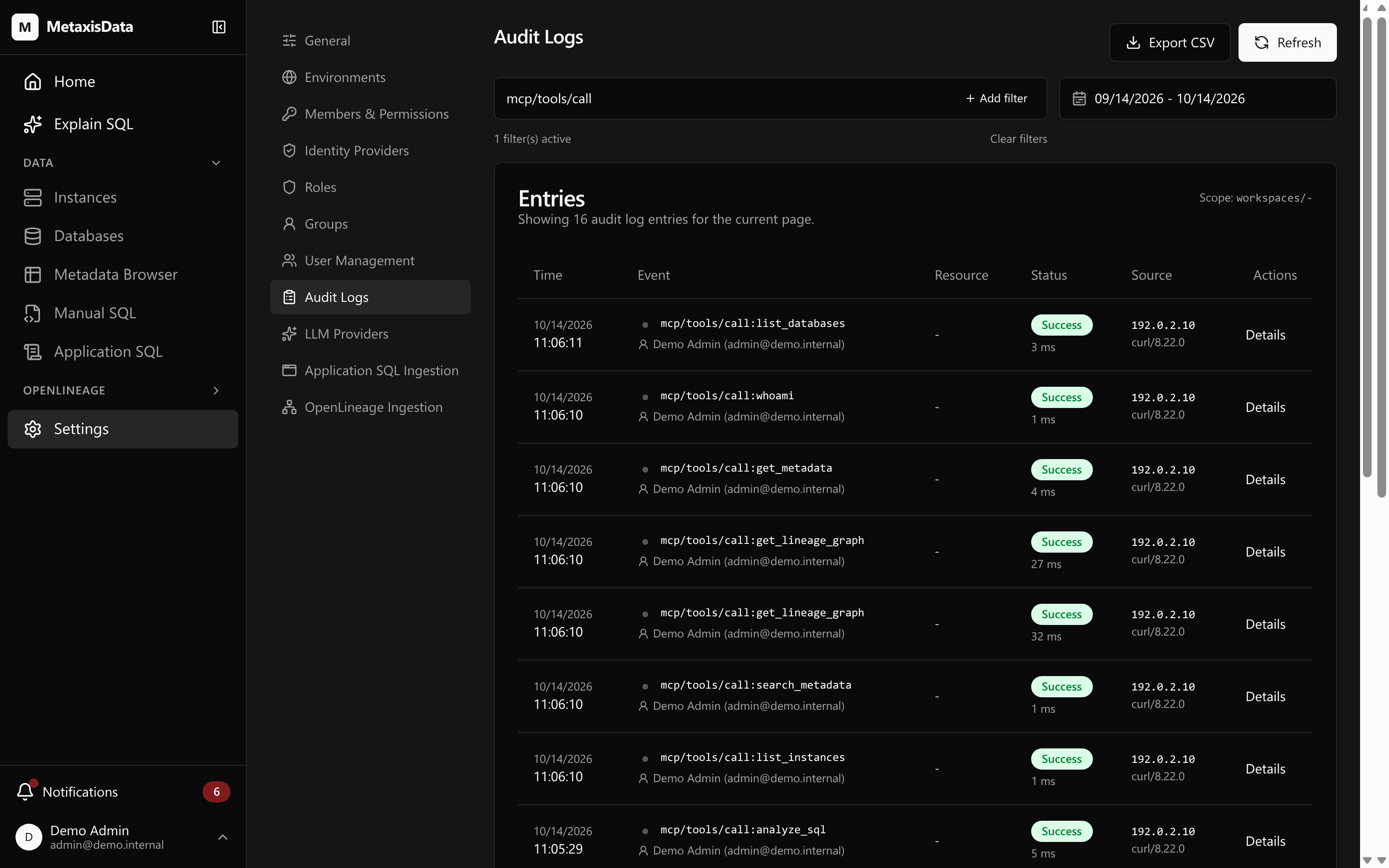
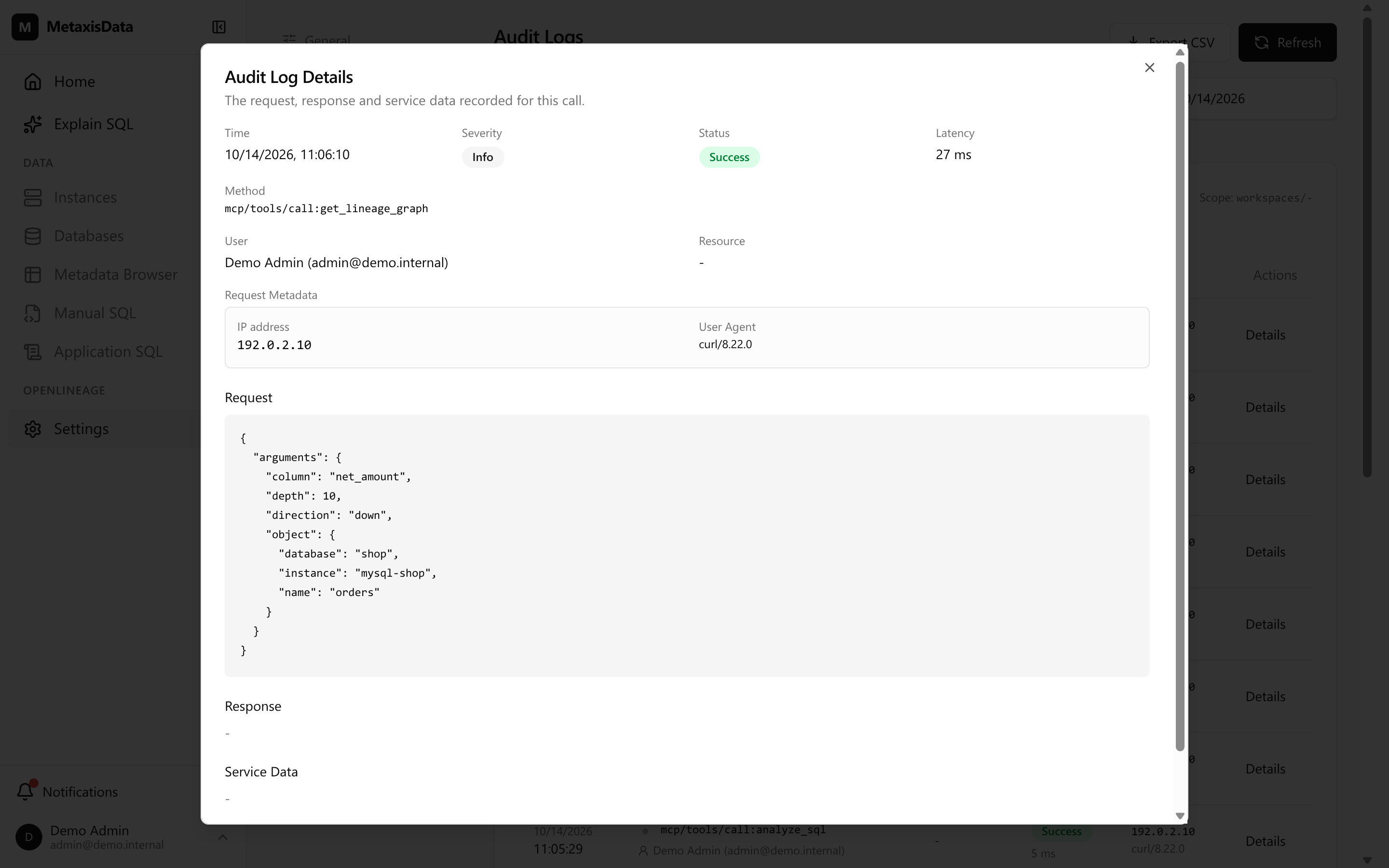
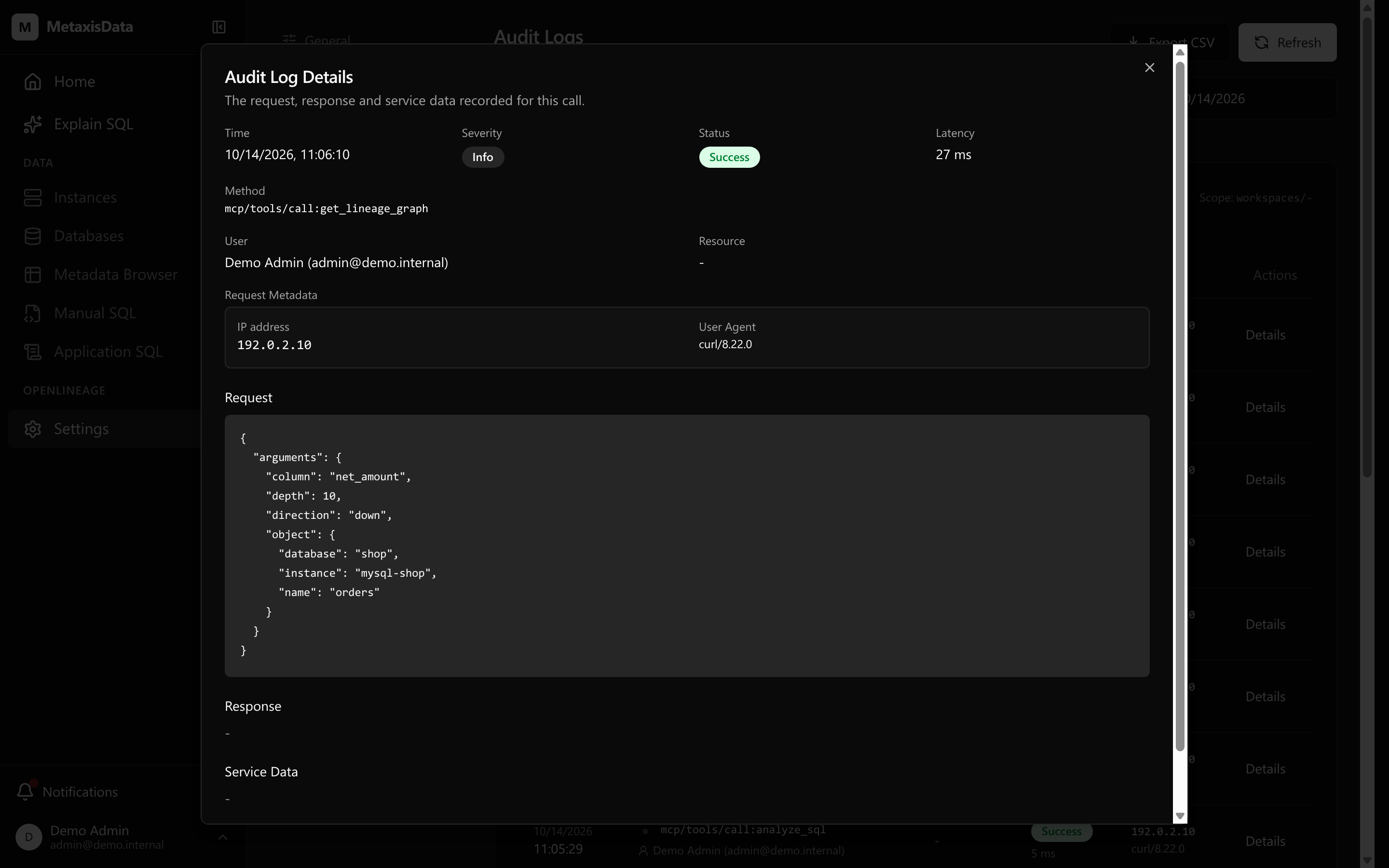
You can see what the agent asked and what it based a decision on. In the other direction, whether anyone asked about dependencies before a change is a question with an answer.
Wiring it into the loop
With the tools in place, what is left is process. Four rules, cheapest first:
- Write it into the instructions. Add a line to the agent's system
prompt: "Before changing any table structure, column name or column type, query the
downstream impact of that column with
get_lineage_graph(direction: "down",depth: 6,column: "<column>"), and put the returned object list in the PR description." - Review the impact list, not just the diff. What a reviewer needs is not the diff but "what does this change touch". A list of thirty-odd objects is easier to judge than a hundred lines of SQL.
- Check it in CI. Run the same query for the column names a pull request touches; when the downstream count is not zero and nobody has signed off, make the pipeline require an explicit waiver.
- Bring the definitions in too. SQL written in a wiki or a reporting tool can be registered as manual-SQL objects; they join the graph and the impact analysis like anything else, so a metric definition no longer needs a second place to maintain.
Why it is safe to hand to an agent
- Read-only. It will not run a migration and will not write back to any instance — what you hand the agent is an answer, not write access. Migration scripts are still yours (and your agent's) to write; the platform's job is to put the blast radius in front of you first.
- Your data stays on your infrastructure. One binary and one PostgreSQL: metadata, lineage and the connection credentials for every instance live in that database, and the credentials can be encrypted — set a key and a database dump on its own is not enough to decrypt them. It reads schemas, not data: no row value is ever copied into the registry.
- Every call is on the record. The two audit records above are what that looks like day to day; the token is read-only, workspace-wide and revocable at any time. Who asked what, and when, is a question you can answer later.
- It does not guess. A statement it cannot parse comes back with a diagnostic — which reference did not resolve, which statement shape is not supported yet — rather than a plausible-looking edge it made up.
- These are the engines it supports today. Lineage analysis covers MySQL, TiDB, MariaDB, PostgreSQL and StarRocks; schema sync covers more (SQL Server included). Analysis for other database types is under active development.
Five minutes to the first answer
- Start a server: use the docker run command at the end of this page. You need Docker and a PostgreSQL the container can reach.
- Create the first account, add an instance, sync its schema (the full steps are in Getting started). When the sync finishes, every table's real metadata is there: columns, indexes, row counts, DDL, change history.
- Turn on MCP in Settings and put the endpoint into your MCP client (the authorization flow and a client config sample are in Connecting an MCP client).
Then pick the table you worry about most and ask one question: if I change this column, what breaks?
If you would rather see three engines wired together first, there is a ready demo environment (metaxisdata_demo): MySQL, PostgreSQL and StarRocks plus four Airflow pipelines, with the data and the lineage already in place — one command brings the whole thing up.
Run it against your own schemas
Start a server, add an instance, turn on MCP — that is the whole path to a first answer on your own instances. The demo stack is one command away.
docker run -d --name metaxisdata \ -p 8083:8083 \ -e PG_URL='postgres://user:password@db-host:5432/metaxisdata?sslmode=disable' \ ghcr.io/ranxy/metaxisdata:latest